- by Daily Talkin Staff
- July 8, 2026
-

-
-
Loading
Loading
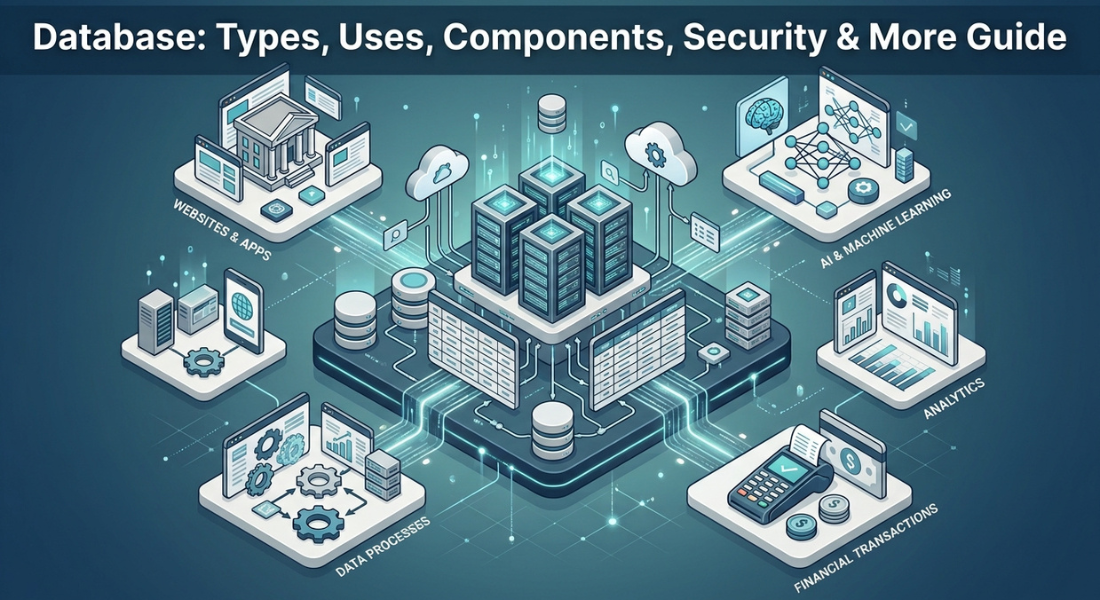
A database is an organised system used to store, manage, and retrieve electronic data efficiently. From customer accounts and online orders to financial records and app activity databases keep information structured so it can be accessed when needed.
But what actually happens when you click “Log in” place an online order, or search for something inside an app? Behind that simple action a database may be receiving a request, finding the right information, checking rules, and returning a result in moments.
Understanding databases means looking beyond tables and stored information. In this guide you’ll discover how databases work, their main types, components, real world uses, security, reliability, scalability, and how they differ from spreadsheets and modern data platforms.
A database stores, organises, manages and retrieves information for users and applications.
Databases can use relational, document, key value, graph, wide column, vector and other models.
A DBMS manages interactions with stored database information while SQL is a language commonly used with relational systems.
Databases support websites, business applications, transactions, analytics and AI workloads.
Security, integrity, optimization, scalability and recovery are important parts of reliable database management.
Different database technologies should be selected according to the structure and requirements of the workload.

A database is an organised collection of data designed to make information easier to store, access, update and manage. Instead of keeping information in disconnected files a database provides a structured environment where data can be retrieved and maintained efficiently.
Databases can store many forms of information from customer records and financial transactions to product catalogues, application data and AI related vector data. The exact structure depends on the database model and the workload it is designed to support.
In simple terms a database is a structured collection of information that can be stored, searched, changed and managed electronically.
The database contains the organised information while other components provide the tools and interfaces needed to work with that information.
A database is designed for more than simply keeping files. It can organise information into logical structures, support queries, control access and allow multiple applications or users to work with shared data.
Key characteristics include:
Structured organisation of information
Fast data retrieval and querying
Controlled creation, updating and deletion
Access permissions and security controls
Support for multiple users or applications
Rules that help maintain data integrity
This makes databases particularly useful when information is frequently accessed, changed or shared across an application or organisation.
A database is the organised collection of data. A database management system (DBMS) is software that allows users and applications to create, query, update and control that data.
A database system is broader still. It can include the database, DBMS, applications, users, hardware and supporting infrastructure that work together. Oracle similarly describes the database, DBMS and associated applications as parts of a database system.
A database works by receiving a request from a user or application processing that request through database software or a database engine accessing the relevant stored information and returning an appropriate result. The exact mechanism varies according to the database model.
At a high level the process involves storing data in an organised structure, accepting queries or other requests, locating the required information and returning or modifying the relevant records. Modern systems can also manage concurrent requests, permissions, transactions and recovery.
The basic database request can be represented as:
User/Application → DBMS or Database Engine → Query/Request → Data Processing → Stored Data → Result
The application sends a request such as finding a customer's recent orders. The database system interprets that request, identifies the relevant data and returns the result to the application.
In relational systems SQL is commonly used to express these requests. OpenStax notes that SQL supports tasks including querying, inserting, deleting, updating, indexing, recovery, concurrency and security in relational database systems.
Data can be stored as tables, documents, key value pairs, graphs or other structures depending on the database model.
When information is requested a query or database operation identifies what is needed. Indexes can help the database locate relevant information without examining every stored record.
The system can also insert new data, update existing information or delete records when authorised.
Real world databases often serve many users and applications at the same time. Database systems therefore need mechanisms for handling concurrent operations while maintaining consistent results.
Transactions group related operations into controlled units. Access controls determine who can perform particular actions while database engines use different techniques to prevent conflicting changes.
Websites, mobile applications and business software commonly communicate with databases through an application layer or API.
A typical architecture may separate the application server from the database server. This separation can allow the application and database layers to scale independently and can improve reliability.
A database management system (DBMS) is software that lets users and applications create, query, update and manage data within a database. It can provide functions for data retrieval, permissions, transactions, metadata and other administrative tasks. Different DBMSs support different database models and workloads.
For a complete breakdown of database management systems see our full guide on Database Management System →
Databases differ according to how they represent, store and retrieve information. A relational database uses tables and relationships, while NoSQL systems can use documents, key value structures, graphs or wide column models.
Database classification can also describe architecture or deployment. For example a database may be relational and cloud based, or non relational and distributed. Therefore “SQL versus NoSQL” is only one way of describing database technology rather than a complete classification system.
Relational databases organise structured information into tables containing rows and columns. Relationships can connect information across multiple tables through keys.
They are widely used for structured and transactional workloads such as financial records, customer information and business applications. SQL is commonly used to query and manipulate relational data.
NoSQL, or non relational is an umbrella term covering database approaches that do not depend on the traditional relational table model.
These systems can be useful for flexible, semi structured or distributed workloads. Their data models include document, key value, wide column and graph databases.
Document databases store information as documents often using formats such as JSON. They can suit applications where records have flexible structures. Key value databases associate unique keys with corresponding values and are useful for simple high speed lookups.
Wide column databases organise data around rows and columns but can allow different rows to contain different columns. Graph databases represent entities and relationships as connected nodes and edges making them useful where relationships are central to the workload.
Vector databases store numerical representations called vectors. These representations can capture relationships or similarities between items such as text, images or other data.
They are particularly relevant to AI applications, semantic search and retrieval augmented generation systems where similarity between vector representations can be used to retrieve relevant information.
Cloud and distributed describe how databases are deployed or operated rather than necessarily defining one specific data model.
A relational database can run in the cloud for example while a distributed database can use multiple servers. Other approaches include multimodel and in memory databases each designed around particular technical requirements.
A relational database stores structured information in tables made up of rows and columns with relationships connecting related data. Primary and foreign keys can help identify records and connect tables.
Relational databases are commonly used for structured transactional workloads while SQL provides a standard way to query and manipulate much of this data.
The full guide can cover relational models, keys, relationships, normalization, ACID properties and use cases in greater depth. For a complete breakdown of relational databases see our full guide on Relational Database →
An SQL database generally refers to a database that uses Structured Query Language to define, query or manipulate data particularly within relational database environments.
SQL can retrieve, insert, update and delete data while also supporting database definition and other operations. SQL is a language however rather than a database model itself.
This distinction is important when separating SQL, relational databases and DBMS technology. For a complete breakdown of SQL databases see our full guide on SQL Database →

A database system consists of several connected elements that allow information to be stored, structured, accessed and managed. These can include the data itself, its structures, queries, database software, applications and users.
The exact components vary between database models. A relational system may use tables, schemas and SQL while a document or graph system uses different structures and interfaces. Understanding these components helps explain how a database operates as a complete system.
The data is the information the database is designed to store and manage. Depending on the application this could include customer records, product information, transactions, messages or analytical information.
Records represent individual sets of related information while fields or attributes describe individual properties within those records.
Relational databases commonly organise information into tables containing rows and columns.
Other models use different structures. Document databases can use documents, key value databases use key value pairs and graph databases represent entities and relationships as connected structures.
A schema describes how data is organised and what structural rules apply to it. In a relational database, this can include table names, fields, data types and relationships.
Metadata provides information about the data and its structure, helping database software and users understand how information is organised.
Queries allow users or applications to request or manipulate information. Common operations include retrieving, inserting, updating and deleting data.
SQL is widely associated with relational databases while other database technologies can provide their own query languages or interfaces.
Database administrators, developers, analysts and applications can all interact with databases in different ways. The DBMS or database engine provides the software layer that controls access to stored information and performs database operations.
A database schema is the logical structure that defines how information is organised within a database. It can describe tables, fields, data types, relationships and constraints particularly in relational systems.
The schema acts as a blueprint rather than the actual stored records. It helps users and applications understand the expected structure of the data and provides rules for organising it. For a complete breakdown of database schemas see our full guide on Database Schema →
Databases power applications and systems that need reliable ways to store, retrieve and manage information. They can support everything from a small application's user accounts to large enterprise systems handling transactions and analytics.
Their value comes from connecting stored information with the applications and people that need to use it. Different database models can be selected according to the structure, volume, speed and relationship requirements of the workload.
Websites can use databases to manage user accounts, product catalogues, orders, content and other dynamic information. For example an online shop may store customer profiles, product details, inventory records and order histories in connected database structures.
Mobile applications can use databases to store profiles, preferences, messages, transactions and application specific information. The database may operate remotely through an API while the application provides the interface through which users interact with the information.
Businesses use databases for customer relationship management, inventory, finance, human resources and operational systems. A shared database can give authorised teams access to consistent information instead of maintaining disconnected copies across multiple files.
Financial systems depend on databases to manage transactions and account information while healthcare systems can use them to manage clinical and administrative records.
These workloads place strong requirements on integrity, availability, access control and security because errors or unauthorised access can have serious consequences.
Databases can provide information for reporting, business intelligence, machine learning and AI applications. Vector databases are increasingly relevant to AI retrieval workflows because they can store vector representations used for similarity based retrieval.
Database optimization improves how efficiently a database stores, processes and retrieves information. It can involve query tuning, indexing, schema improvements, caching or resource management.
The goal is not simply faster queries; effective optimization also considers resource use, scalability, reliability and changing workloads. Detailed performance tuning belongs on the dedicated cluster article.
For a complete breakdown of database optimization see our full guide on Database Optimization →
Database security protects stored information and controls who or what can access it. Common controls include authentication, authorization, permissions, encryption, monitoring and auditing.
Security also depends on the applications and infrastructure surrounding the database. Backup and recovery practices can further reduce the impact of failures or data loss. For a complete breakdown of database security see our full guide on Database Security →
Databases are more than storage locations. They can enforce rules around data integrity, manage concurrent operations, support recovery and handle growing workloads.
The exact capabilities depend on the database technology and architecture but reliable database systems are generally designed around the requirements of consistency, availability, security and performance.
Data integrity means maintaining accurate, valid and consistent information. Database constraints and validation rules can help prevent invalid or conflicting data from entering a system.
For example relational databases can use keys and constraints to maintain relationships between records.
Transactions allow related database operations to be treated as a controlled unit. This is important when several changes need to succeed together. Concurrency controls help multiple users or applications work with the same database without creating inconsistent results.
Backups provide copies of database information that can be restored after accidental deletion, corruption, hardware failure or another disruption. Recovery strategies should reflect the importance of the workload, required availability and acceptable data loss window.
As datasets and workloads grow, databases may need additional resources or architectural changes.
Vertical scaling increases resources on an existing system while horizontal scaling can distribute workloads across multiple machines. Distributed architectures can therefore support certain large scale workloads more effectively.
Security is closely connected to reliable data management. Authentication, authorization, monitoring and access controls help ensure that information is available to legitimate users without exposing it unnecessarily.
For detailed security controls the dedicated Database Security cluster should own the deeper discussion.

Databases, spreadsheets, data warehouses and data lakes all store or work with information but they are designed around different requirements.
A spreadsheet may suit a small manually managed dataset while a database is designed for structured access, querying and multi user workloads.
Data warehouses and data lakes serve broader analytical and data engineering purposes. These technologies can coexist with operational databases rather than simply replacing them.
Spreadsheets are useful for relatively small datasets, calculations, manual analysis and individual or limited collaboration.
Databases are designed for larger managed datasets, structured querying, relationships, access control and concurrent application use. Oracle highlights storage, access, manipulation and scale as important differences between databases and spreadsheets.
An operational database commonly supports day to day transactions and application workloads. A data warehouse is designed primarily for analysis and reporting often bringing information together from multiple sources and structuring it for analytical queries.
A data lake is designed to hold large amounts of data in a broad range of formats, including structured and unstructured information.
A database generally focuses more directly on managing data for defined operational or application requirements, although modern database and data platform technologies can overlap.
A data lakehouse combines characteristics associated with data lakes and analytical database systems.
It can provide broad storage alongside query and governance capabilities for analytics and AI. IBM describes lakehouses as combining low cost storage with query and metadata capabilities.
Database examples are best understood by considering both the database model and the workload it supports. MySQL, PostgreSQL and Microsoft SQL Server for example are database technologies rather than synonyms for the general concept of a database.
Different systems make different design trade offs around data structure, transactions, scalability, performance and application requirements.
Common relational database technologies include:
MySQL
PostgreSQL
Oracle Database
Microsoft SQL Server
These systems are commonly associated with structured, table based data and SQL based querying.
Examples of NoSQL technologies include MongoDB and Redis although they represent different approaches to non relational data management.
MongoDB is commonly associated with document oriented data while Redis is widely associated with key value data structures and fast data access.
An e commerce system might use a relational database for customers, products and orders. A content application might use a document oriented database where flexible records are useful.
AI retrieval systems can use vector databases to store embeddings and support similarity searches. The appropriate choice depends on the application's data and workload rather than on a universal “best” database.
A database is the organised information being managed while database software provides the mechanisms for creating, querying, updating and controlling that information.
Products such as MySQL, PostgreSQL and Oracle Database are examples of database software or database management technologies that can be used to build database systems.
A database is an organised system for storing, managing and retrieving informationbut modern databases involve much more than simple data storage. Different database models support different structures, workloads and application requirements.
DBMSs, relational databases, SQL, schemas, optimization and security are related concepts but each has a distinct role within the broader database ecosystem.
Understanding these relationships provides the foundation for choosing and designing appropriate database technologies.
The dedicated cluster guides on database management systems, relational databases, SQL databases, schemas, optimization and security can provide the deeper technical detail for each specialised area.
A database is an organised collection of information that can be stored, searched, updated and managed electronically.
Databases store and manage information for websites, applications, businesses, financial systems, healthcare, analytics, AI and many other digital services.
Major types include relational, document, key value, wide column, graph and vector databases, while cloud and distributed databases describe deployment or architecture characteristics.
A database contains organised information while a DBMS is software that lets users and applications create, query, update and manage that information.
MySQL, PostgreSQL, Oracle Database, Microsoft SQL Server, MongoDB and Redis are examples of database technologies used for different workloads.
A database is designed for managed, queryable and often multi user data while spreadsheets are generally better suited to smaller datasets, calculations and manual analysis.
No SQL is a language used to define and query data especially in relational databases. it is not the same thing as the broader concept of a database.


Reader Discussion
Leave a Reply